Security policy
This document describes how to report security issues for the Automator project.
Automator is research automation software that interacts with physical hardware. Security issues are taken seriously, but the project does not claim to provide certified or safety-rated security guarantees.
Supported versions
Only the latest release is supported with security updates.
Earlier versions may not receive fixes, especially if they are no longer actively maintained.
Current release baseline: v3.0.0.
Refer to ChangeLog.md for current release information.
Reporting a vulnerability
If you discover a security vulnerability, do not open a public issue.
Please report it privately using one of the following methods:
- GitHub Private Security Advisory (preferred), or
- Direct contact with the project maintainer
When reporting, please include:
- a clear description of the issue
- steps to reproduce (if possible)
- the potential impact
- any suggested mitigation (optional)
- whether the issue affects controller runtime (
dev2/maincontroller.py), diagnostics runtime (dev2/maindiagnostics.py/dev2/main_mjpeg_server.py), or both
You can expect:
- acknowledgement of receipt within a reasonable time
- a good-faith effort to assess and address the issue
- coordinated disclosure where appropriate
Scope and limitations
This project:
- is intended for research and experimental use
- is not a certified security product
- does not provide safety-rated or fail-safe guarantees
Software-based controls (authentication and pause/resume) are best-effort and must not be relied upon as the sole safety or security mechanism.
Users are responsible for securing their deployment environment.
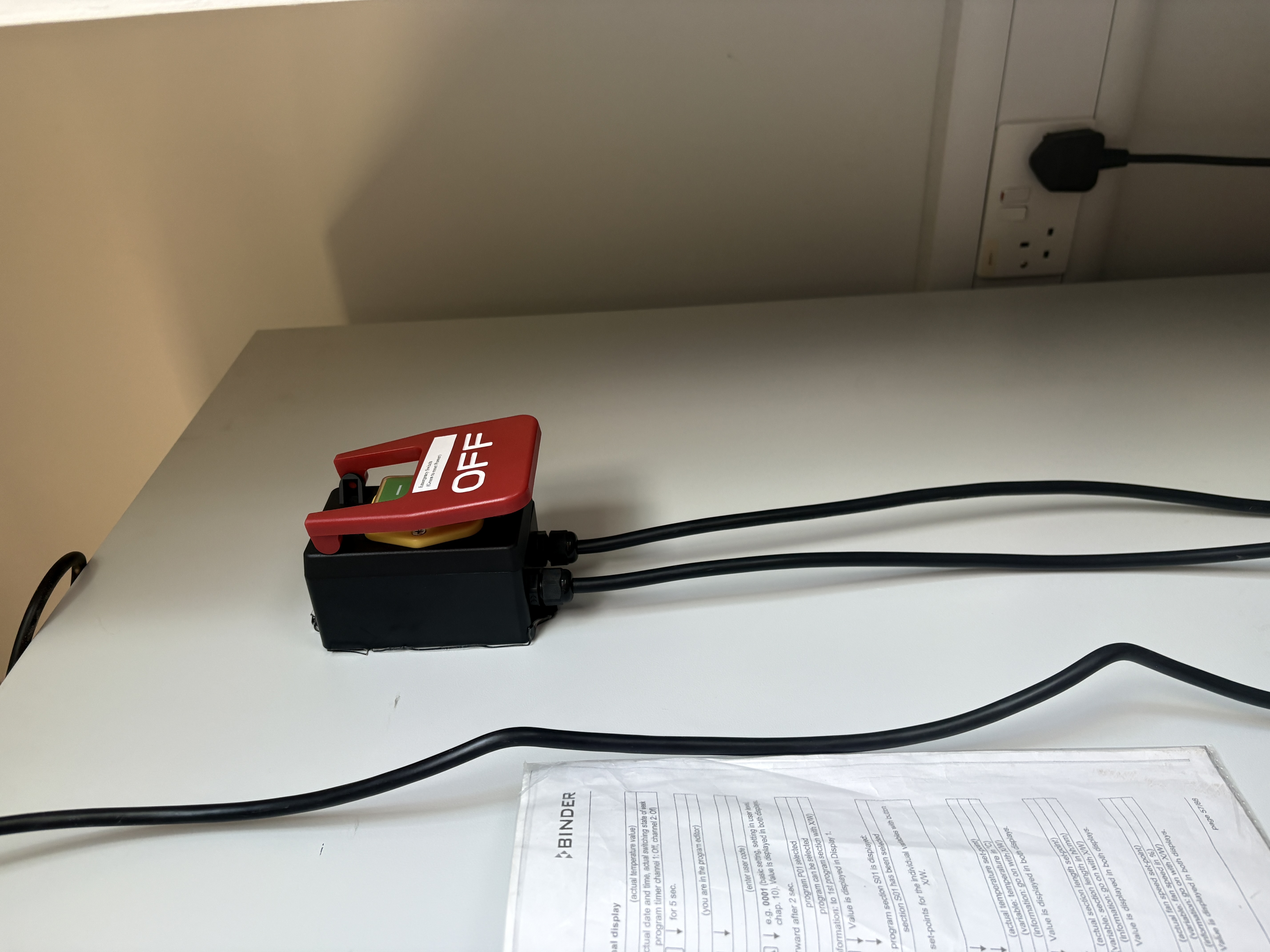
A separate, hard-wired, latching external emergency stop is required; it is wired on the AC input and cuts power to all system supplies in an emergency. The E-stop is located outside the growth chamber, at the controller unit. In an emergency, press the E-stop button on the controller to immediately cut power to all system supplies (reference: hardware/images/estop.jpg).
Credential and service hardening references
For deployed configuration and credential handling, use:
These documents define current baseline controls, including:
- environment-based credential injection (
AUTOMATOR_ADMIN_PASSWORD) - service ownership and startup behavior (
automator-controller.service,automator-buttons.service) - local PolicyKit rule path (
/etc/polkit-1/rules.d/10-moonraker.rules) - normal-user access paths: kiosk display (Pi boots automatically into a full-screen browser at
http://127.0.0.1:8080/; no MacBook needed), direct MacBook Ethernet athttp://192.168.50.2:8080/, or mDNShttp://automator.local:8080/(works from MacBook and from the Pi desktop browser) - admin-only Pi desktop/terminal access: exit kiosk with
Ctrl+Alt+A; Pi desktop browser athttp://127.0.0.1:8080/orhttp://automator.local:8080/ - do not connect the Automator Ethernet cable to the instrument or institute network
Thank you for helping keep Automator safe and responsibly maintained.
Note: A seperate repo is maintained with previous git history of this repo [updated on 16/06/2026 17:00 Hrs]