Security model & credential management
This document describes the security design, authentication model, credential handling, and operational hardening for the Automator controller system.
1. Threat model (scope)
In scope
- Unauthorized access to system controls (motion, vacuum, pause/resume, start/stop)
- Unauthorized access to captured images and mounted network storage
- Accidental remote exposure of local/LAN controller routes
- Accidental credential leakage via Git
Out of scope
- Physical access to the Raspberry Pi
- Compromise of the local LAN itself
- OS-level and network-level firewall rules — these are managed by the NBI Computing Team and are not documented or configured in this repository. The Automator Pi relies on the institute network perimeter for external traffic control.
2. Authentication architecture (High-Level)
The controller uses local HTTP Basic Auth for web access:
| Access Path | Auth Mechanism | Purpose |
|---|---|---|
| Local/LAN | HTTP Basic Auth | Low-latency machine control |
3. Credential source of truth
Username
- Hard-coded in application
- Default and only user:
Password
- Never stored in code
- Supplied via environment variable:
Enforcement
At startup, the controller executes:
ADMIN_PASSWORD = os.environ.get("AUTOMATOR_ADMIN_PASSWORD")
if not ADMIN_PASSWORD:
    raise RuntimeError("AUTOMATOR_ADMIN_PASSWORD is not set")
⚠️ If the password is missing, the application will not start.
4. Local network authentication (LAN)
Mechanism
- HTTP Basic Authentication
- Implemented via
@require_authdecorator
Protected endpoints
Examples (non-exhaustive):
//main/system/*/files/*- All motion, pause, start/stop, and printing endpoints
Credential validation
- Password is hashed in-memory using Werkzeug
- No plaintext password is stored after startup
5. Trusted LAN route model
The controller binds to 0.0.0.0:8080 so the UI can be reached from the Raspberry Pi itself and from trusted LAN/direct-Ethernet clients. Socket.IO CORS is restricted to known trusted origins:
http://127.0.0.1:8080http://localhost:8080http://automator.local:8080http://192.168.50.2:8080
Add or update entries only when a trusted local address changes. Do not add public tunnel domains. Do not connect the Automator Ethernet cable to the instrument or institute network.
Result
/and/mainare Basic Auth UI routes for local/trusted LAN access
6. Environment variable configuration
Required variables
| Variable | Purpose | Required |
|---|---|---|
AUTOMATOR_ADMIN_PASSWORD |
Admin login password | ✅ Yes |
AUTOMATOR_SESSION_SECRET |
Flask session signing key | ✅ Recommended |
Temporary (shell session only)
export AUTOMATOR_ADMIN_PASSWORD="strong-password"
export AUTOMATOR_SESSION_SECRET="long-random-secret"
7. Production configuration
This section defines the authoritative production setup for running the Automator controller safely and reliably.
It assumes:
- The controller runs as a systemd-managed service
- Secrets are never stored in Git
- Restarts must be safe and deterministic
7.1 systemd service configuration
Edit (or create) the service file:
Minimal recommended configuration:
[Unit]
Description=Automator Controller
After=network.target

[Service]
Type=simple
User=pi
WorkingDirectory=/home/pi/Automator

# 🔐 Inject password securely
Environment="AUTOMATOR_ADMIN_PASSWORD=strong-password"

ExecStart=/home/pi/Automator/venv_clean/bin/python /home/pi/Automator/dev2/maincontroller.py

Restart=no
StandardOutput=journal
StandardError=journal

[Install]
WantedBy=multi-user.target
7.2 Apply and enable
sudo systemctl daemon-reexec
sudo systemctl daemon-reload
sudo systemctl enable automator-controller.service
sudo systemctl restart automator-controller.service
Verify:
7.3 Environment verification
Confirm secrets are loaded:
Expected (redacted):
7.4 Logging & recovery
- Application logs:
/home/pi/Automator/raw/controller.log - systemd logs:
- Service does not auto-restart automatically (
Restart=no) - Controller output is available via
journalctl
8. Secrets handling rules
Allowed
- systemd Environment=
.envfiles excluded by.gitignore- Manual export for debugging
Forbidden
- Hardcoding credentials in Python
- Committing passwords to Git
- Printing secrets to logs
9. Git & repository safety
If credentials were ever committed
- Assume compromise
- Rotate passwords immediately
- Rewrite Git history using
git filter-repo
Deletion of files does not remove secrets from history.
10. Session security notes
- Session cookies are signed using
AUTOMATOR_SESSION_SECRET - Missing secret reduces security but does not block startup
- Long random secrets (≥32 bytes) are strongly recommended
11. File access security
File browser (local)
- Rooted at:
Browser image access
- Route:
/files/and/files/<path> - Rooted at the local image data directory
- Protected by local Basic Auth
Protections (both routes)
- Path traversal blocked — requested path is fully resolved via
pathlib.Path.resolve(strict=True), which follows symlinks before the containment check; symlinks pointing outside the root are rejected with 403 - Requires authentication
- No write or delete operations exposed
12. Physical emergency stop
- The emergency stop is the physical, hard-wired, latching AC-side switch.
- It cuts power to all system supplies in an emergency (reference:
../hardware/images/estop.jpg). - Emergency shutdown must use this physical switch.
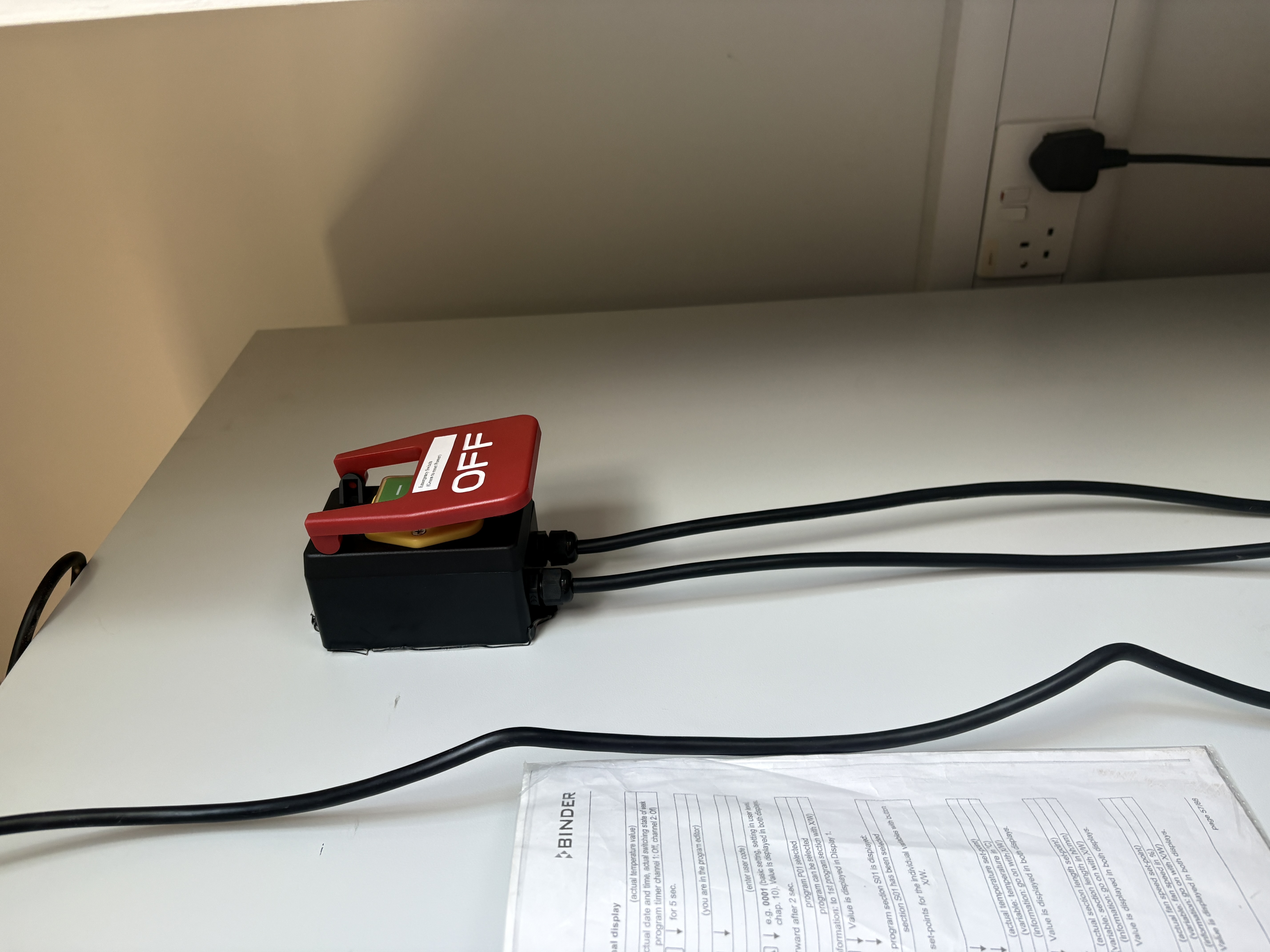
Unauthorized physical access to emergency controls should be managed through normal lab access controls.
13. Security posture summary
| Area | Status |
|---|---|
| Local auth | Hardened |
| Cloud auth | Removed |
| Secret storage | Safe (env-based) |
| Git exposure risk | Controlled |
| Route separation | Enforced |
| Physical emergency stop | Required |
Updated on 11/06/2026