Automator – hardware buttons & systemd services
This document describes the setup for:
- Hardware START / STOP buttons
- systemd services
- PolicyKit permissions used by local control paths
- Pause / Resume behavior
- Web UI Start/Stop behavior (
/system/start_stop) - Virtual environment usage
- Process ownership rules
This reflects the actual deployed configuration and should be treated as the authoritative reference.
Safety-critical note:
- A separate external latching E-stop is hard-wired on the AC input and cuts all system power in an emergency (reference:
hardware/images/estop.jpg).
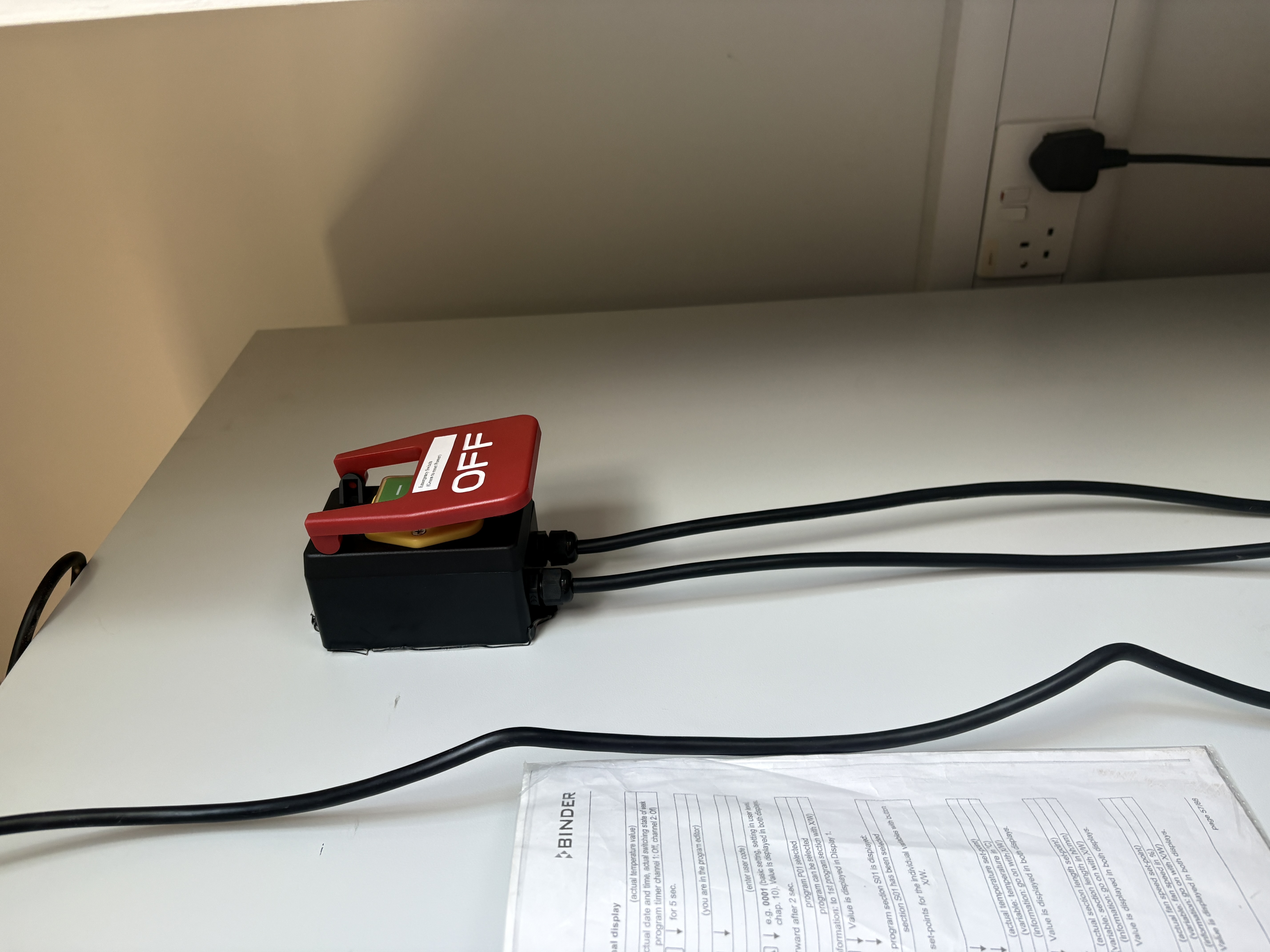
Runtime separation (controller vs diagnostics)
- Controller runtime (production imaging):
dev2/maincontroller.py- primary imaging UI (
dev2/templates/index.html,dev2/templates/index_qr.html) - service/control docs in this file apply to this runtime.
- Diagnostics runtime (internal testing/troubleshooting):
dev2/maindiagnostics.pydev2/main_mjpeg_server.py- diagnostics UI (
dev2/templates/diag_index.html,dev2/templates/login.html) - diagnostics ports/endpoints are documented separately in
diagnosticsserver.md.
High-level design
Goals
- Use systemd as the sole owner of the controller process
- Allow hardware buttons to control runtime behavior
- Avoid duplicate controller instances
- Use existing controller logic
- Ensure safe, deterministic shutdown (Klipper + firmware reset)
Directory layout related to this document
/home/pi/Automator/
├── venv_clean/                 # Python virtual environment
│   └── bin/python
│
├── dev2/
│   ├── maincontroller.py       # Main Flask / imaging controller
│   ├── button_listener.py      # GPIO button listener
│   ├── templates/
│   ├── static/
│   └── ...
│
└── data/
GPIO Allocation
| GPIO | Physical Pin | Purpose |
|---|---|---|
| 17 | 11 | START button |
| 27 | 13 | STOP button |
| 23 | 16 | LED relay |
| 26 | 37 | Door sensor |
| 4 | 7 | Relay pulse trigger output |
| 13 | 33 | Buzzer |
Notes
- Internal pull-ups are used
- No external resistors required
Controller service (automator-controller.service)
This service runs the controller continuously, with automatic restart on failure.
File
Contents
[Unit]
Description=Automator Controller
After=network.target

[Service]
Type=simple
User=pi
WorkingDirectory=/home/pi/Automator/dev2
ExecStart=/home/pi/Automator/venv_clean/bin/python /home/pi/Automator/dev2/maincontroller.py
Restart=on-failure
RestartSec=5
SuccessExitStatus=130

# 🔐 Secrets (do NOT commit)
Environment="AUTOMATOR_ADMIN_PASSWORD=****"
Environment="AUTOMATOR_SESSION_SECRET=****"

# Safety
KillSignal=SIGTERM
TimeoutStopSec=30

[Install]
WantedBy=multi-user.target
Important rules
- Restart=on-failure restarts the controller automatically if it crashes
- SuccessExitStatus=130 treats a deliberate stop (e.g. emergency stop) as a clean exit, not a crash
- When auto-start is enabled, systemd will start the controller at boot
- On
systemctl stop(SIGTERM), the controller turns off the LED relay and releases vacuum and solenoid before exiting — hardware is not left active on a graceful shutdown
Button listener service (automator-buttons.service)
This service runs continuously and listens for GPIO button events.
It never starts Python directly; it always delegates to systemd or HTTP APIs.
File
Contents
[Unit]
Description=Automator GPIO Button Listener
After=network.target moonraker.service klipper.service
Requires=moonraker.service klipper.service

[Service]
Type=simple
User=pi
WorkingDirectory=/home/pi/Automator/dev2

# Placeholder only — set the real controller admin password in the deployed unit on the Pi.
# Do NOT commit the real password to version control.
Environment="AUTOMATOR_ADMIN_PASSWORD=****"
Environment="PYTHONUNBUFFERED=1"

ExecStartPre=/bin/sleep 5
ExecStart=/home/pi/Automator/venv_clean/bin/python /home/pi/Automator/dev2/button_listener.py

Restart=always
RestartSec=2

StandardOutput=journal
StandardError=journal

[Install]
WantedBy=multi-user.target
Important deployment note
The
AUTOMATOR_ADMIN_PASSWORDvalue above (****) is a documentation placeholder only. The deployed/etc/systemd/system/automator-buttons.serviceon the Raspberry Pi must contain the real controller admin password — the same value used byautomator-controller.service. If the placeholder is left in place, the STOP button will be detected correctly by GPIO but pause/resume requests will fail silently with401 Unauthorized.After editing the deployed unit file, apply the change:
PolicyKit rule for Unit/Power actions
This local PolicyKit rule allows user pi to manage required systemd/login1 actions used by Automator control paths.
File
Contents
polkit.addRule(function(action, subject) {
    if (
        action.id == "org.freedesktop.systemd1.manage-units" ||
        action.id == "org.freedesktop.login1.power-off" ||
        action.id == "org.freedesktop.login1.power-off-multiple-sessions" ||
        action.id == "org.freedesktop.login1.reboot" ||
        action.id == "org.freedesktop.login1.reboot-multiple-sessions"
    ) {
        if (subject.user == "pi") {
            return polkit.Result.YES;
        }
    }
});
Controller API base URL
The controller is served locally at:
The button listener uses these endpoints:
| Endpoint | Method | Purpose |
|---|---|---|
/system/state |
GET | Check imaging active / paused state |
/system/pause |
POST | Pause imaging |
/system/unpause |
POST | Resume imaging |
All requests use HTTP Basic Auth with username admin and the value of
AUTOMATOR_ADMIN_PASSWORD from the systemd environment.
Button behavior
START button (GPIO 17)
| Aspect | Description |
|---|---|
| Action | Start controller |
| Implementation | systemctl start automator-controller.service |
| Guard | If automator-controller.service is already running --> ignored |
| Notes | Never launches Python directly |
STOP button (GPIO 27)
| Press Type | Condition | Action | Endpoint / Effect |
|---|---|---|---|
| Short press | Imaging running & not paused | Pause imaging | POST /system/pause |
| Short press | Imaging paused | Resume imaging | POST /system/unpause |
| Short press | Controller not running | Ignored | - |
STOP button authentication requirement
- Short-press pause/resume uses authenticated HTTP POSTs to
/system/pauseand/system/unpause. - The listener reads
AUTOMATOR_ADMIN_PASSWORDfrom the systemd environment at startup. - If the password is wrong, GPIO detection still works (pin state changes correctly) but the HTTP request returns
401 Unauthorizedand the pause/resume action does not occur.
Buzzer (GPIO 13, physical pin 33)
Active piezo buzzer, 3–24 V. Driven via /usr/local/sbin/automator-buzzer.sh which accepts a duration argument (seconds) and uses flock on /tmp/automator-buzzer.lock to prevent overlapping beeps.
| Event | Duration | Trigger |
|---|---|---|
| Run details sent to Automator | 2 s | "Send Run Details to Automator" pressed (POST /config?pulse=1) — fired in a daemon thread, non-blocking |
| USB export complete | 1 s (×3) | USB export systemd service on successful copy |
For the full shared buzzer interface see documentation/usb_export_images.md.
Web UI Start/Stop control (not a hardware button)
| Trigger | Condition | Action | Endpoint / Effect |
|---|---|---|---|
UI Start/Stop click |
Imaging running | Request controlled stop at next safe checkpoint (priority over pause state) | POST /system/start_stop then safe_home() + G1 Z0 + M18 Z |
UI Start/Stop click |
Imaging idle | Prepare ready state | POST /system/start_stop then safe_home() + G1 Z50 |
UI Start/Stop click |
Start preparation in progress (/system/start path) |
Cancel imaging launch before cycle thread starts | /system/start returns cancelled: start_stop_requested |
Web UI Pause/Resume control (not a hardware button)
| Trigger | Condition | Action | Endpoint / Effect |
|---|---|---|---|
UI Pause/Resume click |
Imaging active & not paused | Request pause | POST /system/pause |
UI Pause/Resume click |
Imaging active & paused | Resume | POST /system/unpause |
UI Pause/Resume click |
Imaging inactive | Ignored | API returns ignored: imaging_inactive |
| Pause active | While waiting | Pause-safe outputs + state persist | hold/vacuum released, LED off, save_state(complete=False) |
| Resume from pause | Prior stage had active hold/LED | Restore stage hardware | hold/vacuum and LED restored before continuing same stage |
| Door sensor transient < 3 s | Any imaging state | Filtered — no pause triggered | door_monitor re-reads GPIO after 3 s; if signal cleared, event is discarded (guards against servo PWM noise on GPIO 26) |
UI Dialog/Click Behavior (current index.html)
Pause/Resumeshows a prompt before sending request during active imaging:- Pause prompt:
Are you sure you want to Pause? (System will resume from remaining time of schedule when you press this button again) - Resume prompt:
Resuming from remaining time of schedule. Start/Stopshows a prompt before sending request:- Imaging active:
Are you sure you want to Stop? (System will start from from beginning. Follow Workflow instructions) - Imaging idle:
Starting New Cycle, Follow Workflow Instructions
# Operational Flow Summary

Boot
 1. systemd starts automator-controller.service
 2. systemd starts automator-buttons.service

Runtime
 • START button --> systemctl start automator-controller.service
 • STOP short --> pause / resume
 • UI Pause/Resume --> pause or resume with pause-safe actuator handling
 • UI Start/Stop --> controlled stop (if active) or ready-home (if idle)

Emergency
 • Use the physical AC-side latching emergency stop switch
Troubleshooting
This section lists common failure modes, how they present, and the correct resolution.
All actions assume the system is running on the Raspberry Pi as user pi.
Button listener service issues
| Symptom | Likely Cause | Verification | Resolution |
|---|---|---|---|
automator-buttons.service keeps restarting |
Wrong Python path in ExecStart |
journalctl -u automator-buttons.service shows 203/EXEC |
Verify venv path exists:ls /home/pi/Automator/venv_clean/bin/python |
| Service exits immediately | Python runtime error | Run manually:venv_clean/bin/python button_listener.py |
Fix missing imports or syntax error |
lgpio.error: 'GPIO busy' |
GPIO already claimed by another process | Traceback shows GPIO busy |
Use different GPIO. Do not share pins |
| Service runs but buttons do nothing | Buttons not wired or wrong pins | raspi-gpio get <pin> |
Verify wiring and pin numbers |
| Service works only as root | User lacks GPIO permissions | groups pi |
Add user to gpio group:sudo usermod -aG gpio pi then reboot |
Controller service issues
| Symptom | Likely Cause | Verification | Resolution |
|---|---|---|---|
| Controller starts twice | Started manually + systemd | ps aux \| grep maincontroller.py |
Only start via systemd or START button |
| START button does nothing | Controller already running | systemctl status automator-controller.service |
Expected behavior (guarded start) |
| STOP button does not pause | Imaging not active | /system/state shows "imaging_active": false |
Pause is ignored by design |
| UI Start/Stop appears delayed | In-flight move still completing | /system/logs shows stop requested then safe stop path |
Expected: stop occurs at safe checkpoint |
Networking / API issues
| Symptom | Likely Cause | Verification | Resolution |
|---|---|---|---|
requests.post() fails |
Controller not running | systemctl status automator-controller.service |
Start controller |
| Auth failures (401) | Wrong password | curl -u admin:... |
Fix AUTOMATOR_ADMIN_PASSWORD |
| STOP button detected but pause/resume does not happen | Wrong AUTOMATOR_ADMIN_PASSWORD in automator-buttons.service |
journalctl -u automator-buttons.service -f -o cat shows 401 Unauthorized; manual curl -u admin:'<password>' -X POST http://127.0.0.1:8080/system/pause with correct password returns 200 |
Set real password in /etc/systemd/system/automator-buttons.service, then sudo systemctl daemon-reload && sudo systemctl restart automator-buttons.service |
| Button service logs connection errors | Controller still booting | journal logs | Harmless; next press will succeed |
| LAN down breaks buttons | Using LAN IP | Check BASE_URL | Use 127.0.0.1 |
GPIO diagnostics
| Command | Purpose |
|---|---|
raspi-gpio get |
Show kernel-level GPIO state |
raspi-gpio get <pin> |
Inspect a single pin |
pinctrl get <pin> |
Modern replacement for raspi-gpio |
groups pi |
Verify GPIO group membership |
Note:
raspi-gpio shows kernel mux state only.
lgpio enforces userspace exclusivity; a pin may appear free but still be busy.
systemd diagnostics
| Command | Purpose |
|---|---|
systemctl status automator-controller.service |
Controller status |
systemctl status automator-buttons.service |
Button listener status |
journalctl -u automator-buttons.service -f |
Live button logs |
journalctl -u automator-controller.service -f |
Live controller logs |
sudo systemctl cat automator-buttons.service |
Show the active unit file as loaded by systemd (verify environment variables) |
journalctl -u automator-buttons.service -f -o cat |
Live button listener output, undecorated |
systemctl daemon-reload |
Reload unit files |
Verified pause/resume diagnostic flow
Use this sequence to confirm the full chain is working end-to-end:
pinctrl get 27— output changes betweenhiandlowhen the STOP button is pressed and released.gpiozero.Button(27, pull_up=True)in a Python shell —.is_pressedreflects the physical button state.- During active imaging, run:
Expected: 200 {"paused": true}
- Run:
Expected: 200 {"resumed": true}
5. journalctl -u automator-buttons.service -f -o cat — shows live output from button_listener.py (print() statements visible because PYTHONUNBUFFERED=1 is set).
6. During active imaging, a STOP short press sets paused to true; a second short press sets it back to false.
If steps 1–2 pass but step 3 fails with 401, the password in automator-buttons.service does not match the controller — see the deployment note above.
Safe recovery steps
| Scenario | Action |
|---|---|
| Buttons unresponsive | Restart button service |
| Controller wedged | Use Start/Stop if responsive; otherwise stop/restart the service after confirming the machine is safe |
| GPIO conflicts | Move to unused GPIO |
| Unknown state | Reboot Pi |
Important notes
- Do not share GPIO pins between processes
- Use systemd as the single process owner
- Use HTTP APIs for runtime control
- Use the physical AC-side latching E-stop for emergency shutdown
- Document GPIO usage before adding hardware
- Use this document in conjunction with all
.mdfiles in this repository